Bloque de estado de finalización del curso
- Gestionando bloques
- Configuraciones de bloque
- Revisión de accesibilidad
- Resultados de actividad
- Actividades adicionales
- Marcadores para Admin
- Administración
- Menú del blog
- Marcas del blog
- Calendario
- Comentarios
- Estado de finalización del curso
- Resumen del curso
- Resumen del curso o sitio
- Cursos
- Retroalimentación
- Flickr
- Búsqueda global
- Anuncios recientes
- Insignias recientes
- Planes de aprendizaje
- Ingreso
- Usuario ingresado
- Aprendices
- Navegación
- Usuarios en línea
- Archivos privados
- Entrada aleatoria del glosario
- Actividad reciente
- Entradas de blog recientes
- Cursos accedidos recientemente
- Elementos recientemente accesados
- Canales RSS remotos
- Búsqueda en foros
- Auto finalización
- Actividades sociales
- Cursos destacados
- Marcas
- Texto
- Línea de tiempo
- Eventos próximos
- YouTube
- Bloques FAQ
- (Moodle 4.x) Bloque de menú principal
Nota: Pendiente de Traducir. ¡Anímese a traducir esta página!. ( y otras páginas pendientes)
Mostrar el estatus de finalización del curso
The course completion status block shows what has been done towards Finalización del curso. completing the course]]. The student and teacher will both see this block. The "More information" link will lead to a more detailed report. This report can have some interactive elements in the form of check boxes for the student and teacher.
Student view of Course completion status block
The student can see their progress in the course by looking at the content of the block or clicking on the "More details" link to see a report.
The student, if required, can mark an activity as completed on the course's homepage.
-
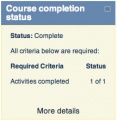 Course completion status block, student view
 -
 Course completion report, student view, 1 course
 -
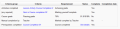 Course completion report, student view, 2 courses - teacher needs to mark complete
 -
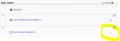 Course homepage, students has completed lesson, needs to self complete quiz


Vista del profesor del bloque de estatus de finalización del curso
This block shows the status for each student. It is also the place where the teacher (or others) can mark the course as complete.
- Note: The course completion status block will only appear if completion tracking criteria are set in Settings > Course administration > Completion tracking. This is what the teacher sees:
-
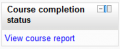 Course completion status block, teacher view, 1 course
 -
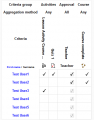 Course completion report, teacher view, 1 course
 -
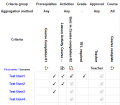 Course completion report, teacher view, showing prerequisite


Capacidades
There is just one capability: Be shown on completion reports
