Text editor: Difference between revisions
From MoodleDocs
Add some images, This is the HTML editor 2.0 page |
→Color pickers: show examples |
||
| Line 22: | Line 22: | ||
There are 4 levels of selecting a font or background color, | There are 4 levels of selecting a font or background color, | ||
*A quick pick 5x8 matrix of colors | *A quick pick 5x8 matrix of colors | ||
*A rainbow color picker tab | *"More colors" that links to Picker, Pallet and Named tabs | ||
<gallery> | |||
Image:HTML_editor_color_selector_basic_1.png|A quick pick 5x8 matrix of colors | |||
Image:HTML_editor_color_selector_more_picker_1.png|A rainbow color picker tab | |||
Image:HTML_editor_color_selector_more_pallet_1.png|A Pallet tab with a 18x12 matrix of colors | |||
Image:HTML_editor_color_selector_more_named_1.png|A Named tab with custom pallets | |||
</gallery> | |||
===Insert images and media=== | ===Insert images and media=== | ||
*[[Image:HTML_editor_group_insert.png]] | *[[Image:HTML_editor_group_insert.png]] | ||
Revision as of 20:15, 5 December 2010
The Moodle 2.0 HTML standard editor uses TinyMCE but other Text editors can be used.

List of groups
For those who are not familiar with the tool bar, here are the functions listed by group using the above example. Remember that the site administrator can edit or provide additonal toolbars.
 - Font, size and heading group
 - Color group
 - Find and Replace group
 - Formatting group
 |Full screen toggle
 - HTML source toggle & spellchecker
 - Insert group
 - Link group
 - Number and Bullets and indents
 - Paragraph group
 - Undo and Redo group


Special features
Color pickers
There are 4 levels of selecting a font or background color,
- A quick pick 5x8 matrix of colors
- "More colors" that links to Picker, Pallet and Named tabs
-
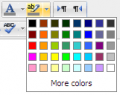 A quick pick 5x8 matrix of colors
 -
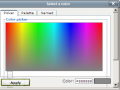 A rainbow color picker tab
 -
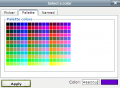 A Pallet tab with a 18x12 matrix of colors
 -
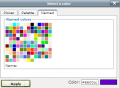 A Named tab with custom pallets


Insert images and media
This feature uses the File picker and the File bank to manage files and reposities of media files.
See also
Text editors - Moodle 2.0 will handle many kind of text editors
